
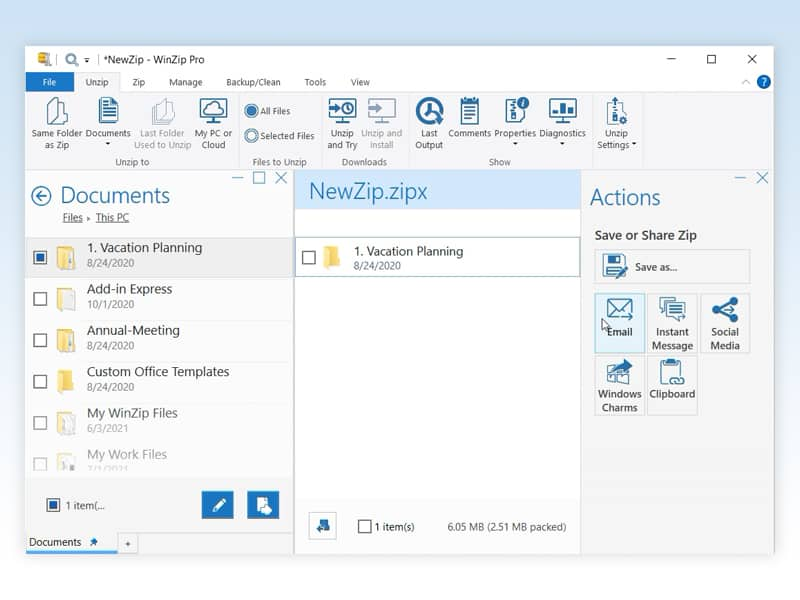
We review current product information, care guidance, and purchasing considerations to help you compare options. Always confirm the final specifications, price, and retailer policies before ordering.
In this guide
The short version
WinZip is easiest to justify when preparing, protecting, and sharing files is a recurring job. Someone assembling client folders every week has a more convincing reason to evaluate it than someone opening an occasional ZIP attachment. The buying question is whether its paid workflow saves enough effort on your own files.
This is a research-based review for U.S. readers, based on official product and support information and public customer feedback. We have not installed WinZip, measured compression speed, or tested encryption or recovery. Simply Room may earn a commission through links in this article.
Check what your computer already does
Microsoft documents ZIP creation and extraction in Windows. Its guidance also says Windows 11 version 24H2 supports ZIP, RAR, 7z, and TAR formats, while operations on encrypted archives require another application. An unfamiliar archive extension is therefore a reason to check your Windows version and the file itself before buying software.
For ordinary folders and occasional attachments, try the built-in workflow first. Microsoft also notes that already-compressed JPEG images may gain little size reduction from zipping. Packaging files together can still be useful, but do not equate a ZIP file with a large storage saving. These are platform capabilities and general purchasing considerations, not results from a Simply Room comparison test.
Where the paid workflow makes more sense
WinZip markets a combined environment for compression, encryption, file management, and sharing. Its Windows product page describes working across computer, network, and cloud locations, with support for opening formats including Zipx, RAR, 7z, and TAR. Format support does not mean every format can be created, or that every recipient can open every archive you send.
Our strongest use case is a repeated sequence: gather documents, prepare an archive, and deliver it through a familiar sharing route. During evaluation, try that complete sequence with harmless sample files and ask the intended recipient to open the result. A useful feature should remove a step you regularly perform; a long feature list alone does not establish value.
Choose the exact edition and platform
The official catalog separates WinZip compression products from bundles and other utilities. Its suite overview presents Standard for everyday archiving, Pro with additional workflow tools, and Ultimate with WinZip PDF Pro. The standalone Windows comparison and suite offers should be read separately: similarly named plans do not establish identical entitlements.
Before paying, match the exact product name, operating system, device allowance, and features to the order summary. Mac has a separate product page; do not assume the Windows screenshots or a Windows offer describe the Mac license. We would start with the least expensive edition that covers a demonstrated need and consider a larger bundle only after identifying which extra application we would use.
Use the trial to answer a specific question
The official homepage advertises a 21-day trial, and the registration knowledge-base article also describes a 21-day evaluation, with Pro features available for the first 14 days before switching to Standard features. Another official marketing page advertises a 30-day trial. Those differences make the exact download and offer terms more useful than a remembered headline.
Confirm the evaluation period and available features for your installer before starting. Test several representative folders, note the steps required, and verify that the recipient can open what you send. If a feature disappears partway through evaluation, check the edition rather than assuming the paid entry-level plan includes it. We would avoid buying until the useful workflow and its required license are both clear.
What customer feedback adds
Public reviews on the WinZip Computing Trustpilot profile for shopm.winzip.com include complaints about promotional prompts, activation difficulties, and renewal or cancellation confusion. Some accounts concern other WinZip-branded utilities, and the profile spans countries and older purchases. It is not a clean sample of the current Windows archiver or a representative U.S. satisfaction survey.
We treat those reports as reasons to check activation, notifications, and account management during evaluation, rather than as proof that every installation has the same problems. U.S. reviewers also describe renewal and installation frustrations. Keep the exact product name and order reference when contacting support so an issue with one utility is not confused with a different subscription.
U.S. checkout and renewal checks
We are not quoting a fixed U.S. price: the edition, offer, and billing arrangement need to be confirmed in your checkout. Record the currency, total due including any tax, license duration, device coverage, and any separately listed extras. If the offer renews automatically, save the renewal amount and date as well as the initial price.
WinZip’s billing support says the confirmation email generally contains a link to cancel or manage a subscription. If it is missing, its purchase-lookup process can retrieve order details using the purchase email address. Cancellation stops future renewals; it does not itself refund a completed payment. Save the cancellation confirmation instead of assuming uninstalling the application settles billing.
Refunds, delivery, and our verdict
For downloads bought through the WinZip Online Store, the official return policy says you may request a full refund within 30 days of purchase. It directs requests to Cleverbridge and says purchases from other online stores must follow that store’s process. Confirm the policy attached to your order, especially for an app-store purchase or a renewal; do not assume a new-purchase promise automatically resolves every billing scenario.
This is a digital-software decision: download access, activation, and billing records matter more than physical shipping or a return label. If activation fails, contact the relevant support channel promptly and keep the receipt and correspondence. The money-back policy is not evidence that we have tested performance or a substitute for checking compatibility.
Our verdict: evaluate WinZip if you repeatedly prepare and share archives and can identify a paid feature that makes that job easier. Pause if your needs end at occasional ZIP extraction, if a bundle adds tools you will not use, or if the renewal terms remain unclear. Buy the workflow you have verified during evaluation, with the exact edition and billing commitment recorded.
Before you order
Check the exact model, current price, return terms, and manufacturer instructions. Save the listing and order details so you can refer to them later.
Explore the brand guide ↗